Saturday, April 30, 2011

GammaTech Showing Off New Line of Notebooks at the 2011 Joint Warfighting Conference

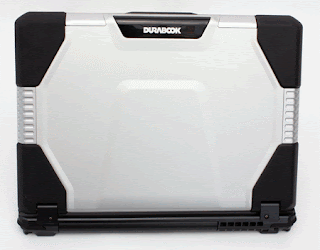
GammaTech DurabookGammaTech Computer Corporation, one of the world's major manufacturers and suppliers of innovative notebook and tablet computers, is all set to show off its new Durabook line of rugged notebooks including the new S15C and U12C during the 2011 Joint Warfighting Conference. The conference will take place at the Virginia Beach Convention Center in Virginia Beach, Virginia from May 10 until May 12, 2011.

GammaTech makes products that are rugged, durable and rigorously tested. They are designed to withstand the most demanding of situations whether it be in the field or at the office or even for transportation. There are three models that are set to be shown, all of which are built to Military Standards for drop, shock, spill and dust protection. Models offer security features like Fingerprint Recognition, Smart Card Reader and TPM 1.2 support. They can also all be configured to meet the user's unique requirements.

The U12C features a 12.1" WXGA touchscreen TFT LED backlight display that can easily convert into a tablet PC. The device is encased in magnesium and has also been tested to MIL-STD-819G standards for drop, shock and spill protection. All of the ports also have protective coverings as well. The U12C is powered by the Intel i5 processor to maximize speed and data management.

The S15C comes equipped with a 15.6" HD display and is also powered by the Intel i5 or i7 processor. Standard features include an RS232 serial port, TPM 1.2 data security and a Smart Card Reader. You can also get Bluetooth 2.1 as well as a 1.3 megapixel web cam. This device is also encased in magnesium and is tested to MIL-STD-810G specifications for drop, shock and spill protection.

The final device is the D14RM which is drop, shock and spill resistant and is designed specifically for road warriors. The device is powered by Intel Montevina technology giving it a nice performance boost. This device also features a 14.1" WXGA display and an LED backlight illuminated keyboard. Standard features include a Smart Card Reader, fingerprint scanner, TPM 1.2 technology, four USB ports and one HDMI port.

Source: PRLog - GammaTech to Display Rugged Notebook at 2011 Joint Warfighting Conference

A Tech Travel Agent can get a laptop rental to you within 24 business hours in over 1000 cities worldwide. Call 800-736-8772


We have 3987 Installers, Technicians and Engineers stationed in nearly 1000 locations worldwide to serve you.

Monday, April 18, 2011

Helpful Tips for Your First Trade Show

technology conventionsWith all the advancements in technology taking the physical meeting aspect out of business meetings or board room conferences, there really is no substitute for the good ol' fashioned face-to-face meeting one gets at a trade show or event. In the United States alone there are around 2,200 trade shows and industry expos held annually, however, this number is down almost 25% from the past three to four years. The good news is that a lot of new shows are popping their heads up this year and some discontinued ones have seen new life sparked into them and attendance is expected to improve.

If you run a small business and you want a higher profile in your industry or are looking for new clients, new partnerships or are needing to get up to par on certain trends, you should consider exhibiting or at least attending a show this year. Here are a few helpful tips and practices for getting the most out of your trade show without breaking the bank.

Budget Your Time. Familiarize yourself with the layout of the show floor and the schedule of events. Once you do this, plan your time accordingly. Try to talk with the event manager in advance and request a list of past attendees and pre-registrants.

Partner to Save. A lot of small companies often split rental fees on exhibit space with two to three other small businesses that complement them. By doing this you can save money and maybe even make a few new contacts while you're at it.

Know Your Goal. You need to determine whether or not you will be selling a product or taking orders at your show. This is known as a Contract Event. Otherwise, you will be meeting people and forming relationships in what is known as a Contact Event.

Go Minimalist. It is possible to purchase a reusable, fabric-covered back wall for your booth at a pretty cheap price (around $500). You can also get a folding easel for around $20. You could split these costs with your partners if you want to. The wall can be shipped to your hotel or be folded up and checked as baggage.

Give It Time. If you do plan on attending a show, don't try to squeeze it all into one half-day or a few hours, especially if this is one of the biggest events in your industry.

Tell the Manager About Your Company. Reporters for industry publications typically ask the general manager for tips on new exhibitors they can profile during the event. If you talk to the event manager, then they may tell the trade press about you. It's like free press, what can be better?

Rent Your Technology. If you need something like a laptop, computer, monitor or plasma display, you should know that you do not always need to buy it. Why spend all that money on something that you will only be using once or twice a year? Renting technology can save you a lot of time and money and is extremely convenient for trade shows and events.

So there you have it, some helpful tips to guide you through your first trade show, convention or event. These tips can make your first experience exponentially better than most others and will definitely give you some much needed advice.

Source: Bloomberg Businessweek - When It Pays to Spend on Trade Shows

Computer Service Now

Friday, April 01, 2011

Octavius Convention Center Receives LEED Silver Certification

Caesars Entertainment Corporation logoThe expansion of the Octavius Convention Center at Caesars Palace Hotel and Casino by the Caesars Entertainment Corporation has just been awarded LEED Silver certification by the U.S. Green Building Council and was also verified by the Green Building Certification Institute. According to Eric Dominguez, Corporate Director, Energy & Environmental Services for Caesars Entertainment, "The attainment of LEED Silver Certification for the Octavius Convention Center is a large achievement for Caesars Entertainment and its conservation and sustainability efforts. By using less energy and water, the convention center will effectively save environmental resources and decrease our greenhouse gas emission, contributing to a healthier environment for our employees and the community." The 110,000 square feet of available space, as well as the 52,000-square-foot ballrooms, both of which were completed by Design and Construction Group , was given the prestigious green building certification as a result of its sustainable building and operations practices to conserve energy and water. The Octavius Convention Center earned a total of 35 points for its green design and construction features like energy efficient lighting and water smart fixtures. "Caesars Entertainment's LEED certification demonstrates tremendous green building leadership," said President, CEO and Founding Chair of the U.S. Green Building Council Rick Fedrizzi. The urgency of USGBC's mission has challenged the industry to move faster and reach further than ever before, and the Octavius Convention Center expansion project serves as a prime example of just how much we can accomplish." Dominguez stated that the Octavius Convention Center will be the first of many LEED certified buildings at Caesars' properties in the United States. Caesars Entertainment leads the meetings and conventions industry in sustainability via its green meetings certification program and employee-driven practices. Employees at the company can become certified by attending a two-day course on green meeting planning strategies and initiatives and by completing a comprehensive sustainability exam on which they must score a 100% to obtain certification. There are 12 employees in Atlantic City and over 100 in Nevada who have received the certification and are working with companies to plan events with minimal environmental impact and waste. Source: PR Newswire - Octavius Convention Center Awarded LEED Silver Certification by the U.S. Green Building Council

A Tech Travel Agent can get a laptop rental to you within 24 business hours in over 1000 cities worldwide. Call 800-736-8772 We have 3987 Installers, Technicians and Engineers stationed in nearly 1000 locations worldwide to serve you.

Saturday, March 19, 2011

2011 Rental Manager Software Released by Xgensoft

Michael Saunders, President of Xgensoft, recently announced their 2011 version of their Rental Manager software, the small business rental management software, which has a few noteworthy changes that a lot of people will be interested in hearing about.

Saunders went on to explain that, "Xgensoft has rebuilt its Rental Manager software in Access 2007, allowing a much greater processing speed and a larger number of simultaneous users." Saunders went on to say that, "the significance of this is faster data retrieval with more users accessing the data simultaneously."

The Rental Manager software from Xgensoft has been used to provide smaller rental businesses with a comprehensive, integrated rental inventory/business management program at an affordable price. This has been the goal of Xgensoft since they released the software for the first time back in 2003.

The upper limits of the software were originally between 5 and 10 simultaneous users. One concern for multi-user environments is always data retrieval speeds. The software will now support a lot more simultaneous users with an increased retrieval speed.

The 2011 edition of the software strengthens the Rental Manager program by providing rental business entrepreneurs with a software that handles the needs of a smaller rental business. The software also continues to handle their expansion needs by supporting more concurrent users while maintaining the integrity and speed of the program.

In addition to that, Xgensoft has now ensured that the 2011 Rental Manager software is 64-bit and 32-bit compatible which makes the software able to be used with the next generation of small business computer technology.

Source: PR-USA.net - Xgensoft Releases 2011 Edition of Rental Manager Software
A Tech Travel Agent can get a laptop rental to you within 24 business hours in over 1000 cities worldwide. Call 800-736-8772


We have 3987 Installers, Technicians and Engineers stationed in nearly 1000 locations worldwide to serve you.

Saturday, March 05, 2011

Amazon Extends Its Reach to Japan

Amazon recently expanded its remote computing service to Japan. That's right, the Land of the Rising Sun has been added to Amazon's remote computing services after the company found out that developers in Japan required more data storage as well as faster data transfer times.

AWS, the Amazon Web Service, has just opened a Tokyo Region Cloud Services and computing resources dedicated to Japan. The company offers Amazon EC2, which is a virtual computer rental service, as well as Amazon S3, a web storage service. Both services have a Japanese forum as well as a Japanese web site.

Amazon used the term Region to call its Amazon Web Services due to the computing resources which are dedicated to Japan. However, the company did not say where the resources are located which implies that the data centers may be located somewhere else.

Amazon's Web Services began in 2006 and is estimated to have 330,000 developers using the service. Amazon Web Services also has other regions which include Singapore, Europe and the United States. The access, data storage and general computer use from a remote location is known as Cloud computing.

Amazon began in 1995 as an online retailer but quickly expanded to a plethora of online businesses. Amazon is only one of the cloud service providers in the world with one of its fiercest competitors being Rackspace. The two companies find different ways to provide users more control over their data in the cloud.

Source: Top Tech Reviews - Amazon Web Services Expands to Japan

Computers, Desktops, Laptops, Servers and the latest in Portable Tablet PCs are available from your computer rental company, Rentacomputer.com.

Talk to a Rentacomputer.com Tech Travel Agent Today!
Call Toll free 800-736-8772.

Monday, February 21, 2011

Great Benefits to Computer Rentals

benefits to computer rentalsComputer rentals are really useful in a lot of different ways and can help you out in a lot of different scenarios. It is no secret that the economy in our world today has seen better times. The current situation we are in economically can really take its toll on people, especially small or medium-sized businesses that are reliant on having the most up-to-date pieces of equipment.

While having the most up-to-date equipment can do wonders for your business, it can also sink it due to costs and other factors. Continuously buying new equipment can drain your bank account faster than you may think. But thankfully, there is an alternative, a computer rental. Computer rentals can benefit you and your company in many different ways and may even save your business.

Predictable Expenses - Have you ever been looking online or in a store for a computer or other piece of equipment and found a really great price only to go in to purchase the equipment the next week and the price has gone up $200? That happens a lot, but not with a computer rental. With a computer rental you always have a solid price. Your payments will not increase month to month and the price of your rental won't go up either.

Minimal Upfront Expenses - Computer rentals have minimal costs that you are required to pay upfront which allows them to deliver the technology you need at a fraction of the price you would pay to purchase it. This allows you to be more flexible with your equipment and technology.

Flexibility - Do you know what kind of revenue your company will be producing in six months? If you answered yes, then ask yourself how reliable that figure is and if you are willing to bet a lot of your company's income on it? Computer rentals offer great flexibility and allow you to alter your computer rental contracts whenever you need to. This could keep you from making a potentially business-ending decision.

Technicians When and Where You Need Them - For some people, getting technical support can be an all out nightmare. With a computer rental, however, you can get a technician to come out and deliver your equipment, set it up and even test it to make sure it is all working properly. If your equipment breaks or malfunctions, you can have that same tech come back out and troubleshoot your problem and even fix it on the spot. Try getting Dell or HP to do that for you.

Disposable - Computers lose their value as they age. This is because they often become outdated with newer models that are faster, more powerful and able to handle more tasks more easily. Plus, most of the software and things you would need for your computer are designed to run best on the newest products, continually outdating older ones. Buying new computers every couple of years can get very expensive very quickly which is why a computer rental is a great way to stay on top of the new technology and still keep money in your wallet.

These are just a few of the many reasons a computer rental can better support your business over a purchase. So the next time your company needs a computer or another piece of technology, consider getting a computer rental instead.

Source: Vernon Computer Source - Five Ways Computer Rentals Can Come to the Rescue

The Security Camera Blog


Get a regular infusion of new security camera technology information, video and news. Easy to subscribe in a reader or by email.


We help you stay in touch with the latest security camera features.

Monday, February 07, 2011

2011 Tech: What You Should Expect

20112011 is poised to be a big year in the world of technology as companies are seriously finding out what they can do with their products and their technology. There was some good stuff released in 2010 that will show up in some more advanced tech in 2011 so be ready to see some familiarity among products.

Microsoft finally entered the motion control gaming market in late 2010 with their release of Kinect for the Xbox 360. Kinect allows the gamer's entire body to be the controller so nothing tangible is used to play the games. You control on-screen events and actions by waving your body about in certain motions. The company behind that technology is PrimeSense and they are going to supply that technology to Home Theater PC (HTPC) companies in 2011 in order to give movie and TV watchers the functionality of their remote control without their remote control. Look for gesture-controlled devices coming sometime in 2011.

Tablets were a huge thing in 2010 and they are only going to get bigger in 2011. Research in Motion (RIM), who made the BlackBerry, is poised to unveil their entry into the tablet market sometime in 2011. The device, known as the PlayBook, will battle against the Samsung Galaxy Tab, the Dell Streak, the HP Slate 500, the iPad and a whole host of other tablets in 2011. There are a lot of other companies besides computer ones that are interested in jumping on the tablet bandwagon so be prepared to see a lot more tablets coming your way this year.

Wireless displays are something that aren't being talked about a whole lot, but it does appear that they are set to unleash in 2011. The WiGig Alliance said back in November that they will partner with VESA, the international non-profit company that has been known to support as well as set industry-wide interface standards on workstations, PCs and consumer electronics on a wireless DisplayPort. This device will support the same two-way speeds that a wired DisplayPort has and will carry audio as well as video for almost any type of display device from tablets to monitors. AMD, Broadcom, Dell and Micrososft have already hopped on board with the WiGig Alliance and a few big movie studios are showing interest as well.

This is just the tip of the iceberg when it comes to new tech in 2011. There are so many more great products and ideas on the way that I could write for days about. These are some of the main ones that a lot of people will be interested in but keep checking back here as we will be giving you up-to-date information on all the latest technology news.

Source: CRE


Looking for a way to really spruce up your event booth? Watch this short video titled, "The Plasma Rental Impact on your Trade Show Booth"


Renting Audio Visual equipment for your next event can be a real money saver if you aren't looking to spend a lot of money. Why not try a Plasma Display Rental? Talk to a Tech Travel Agent today Call 800-736-8772.

Friday, January 21, 2011

Mac Rentals: Which One is Right for You?

One of the most popular brands in the laptop rental industry is definitely Apple. Mac laptops offer a lot of great features to the traveling businessman. However, there are so many different ones out there that it is hard to determine which one is the right one for you. The first step is determining what kind of traveling businessman you are.

If you are a video editor, graphic artist, web designer or photographer, then you may want to go with a Mac Pro Rental. These computers have a 3.0 GHz Quad-core or 8-core Intel Xeon processor, 4GB of memory, 250GB to 320GB of hard drive space, the Apple Cinema 23" or 30" display and a 16x SuperDrive CD/DVD drive.

If you are more of a sales professional, line producer, marketing executive or a consultant, then you may be best suited by a MacBook Air Rental. MacBooks come with either a 1.83 GHz or 2.4 GHz Intel Core 2 Duo processor, 2GB of memory, 120GB to 160GB of hard drive space, a 13.3" display and an 8x SuperDrive CD/DVD drive.

People attending seminars, evaluations or training seminars or who are part of a production staff or registration process may want to look into an iMac Rental. iMac machines come with a 2.4GHz Intel Core 2 Duo processor, 2GB of memory, 160GB to 250GB of hard drive space, a 20" display and an 8x SuperDrive CD/DVD drive.

A MacBook Pro Rental is perfect for anybody who is creative, a business professional or a photographer. MacBook Pros come with either a 2.1GHz or 2.6GHz Intel Core 2 Duo processor, 2GB of memory, 200GB to 250GB of hard drive space, a 15.4" display and an 8x SuperDrive CD/DVD drive.

But, if you are still unsure, then you can either talk to a Mac rental professional at RentAComputer.com or create a custom Mac rental tailored to your specific needs. Whatever you need, RentAComputer.com is sure to have it.
A Copier Rental is a quick way to mass produce important documents for potential customers at an event or conference. Renting office equipment is simple and easy and it can also save you loads of time and money. Rentacomputer.com has been offering copier rentals to more than 1000 cities worldwide for over 20 years.

Saturday, January 08, 2011

Keep Your Business Profitable with Technology Rentals

Computer RentalsAs anybody in business knows, when your business grows, your needs can change. Your needs may change from having a simple printer or fax machine one year to needing a stand alone printer, photocopier and wireless network the next. So it's obvious that keeping up to date with your computer rentals can save you a lot of time and money.

A computer rental is all about cash flow improvement. When you buy a computer or computers, all your money is going out the door at one time. But with a computer rental, you only pay as you need them, and they always allow you to stay in touch with the most up-to-date technology and trends. Whenever you need an upgrade, you know that you do not always need to throw down a sizable investment.

It is no secret that if equipment costs less, then you can afford more of it. Your growing business may need a lot of things, like a network printer for each department as opposed to just one for the entire company. And by renting, you can get the extra printers in your office immediately rather than having to borrow money or wait on a bank approved loan. Renting also leaves your cash available for use and lines of credit open for other business expenses.

Let's look at an example. Let's say you work for a customer service center and you need to employ extra staff for the holiday season. Buying new computers for each of those new employees would cost thousands of dollars, while the people are only going to be there for a few months. Instead, look at renting the equipment.
Renting the equipment:
Prevents a surplus of equipment sitting unused after the project has been completed.
Means short-term, fixed-price equipment can be factored into the cost of the project.
Allows for tax deductions for rental fees.
Protects the business from a short-term cost shock.

In the world of business, which is rapidly changing, your ability to swiftly react to change could be the key difference between increasing your income and going broke. Buying your equipment definitely gives you certainty and also builds your assets base, but there are definitely times when a rental can be the smarter business decision.

Source: PC Retro Rentals
A Tech Travel Agent from Rentacomputer.com, the Worldwide Technology Rental Company will schedule installation of projectors, computers, and office equipment on a permanent or temporary basis in over 1000 cities worldwide. Call 800-736-8772

We have 3987 Installers, Technicians and Engineers stationed worldwide to serve you.

Wednesday, December 29, 2010

Plasma and Monitor Rentals for a Gaming Tournament

In the technology rental industry, plasma screens are acquired for a plethora of different reasons. Many people get them for a booth at a trade show, conference or convention, and others rent them for maybe a business meeting or as a quick solution for a visual aid. But one thing that plasma rentals are perfect for are gaming tournaments.

If you do not know what I mean, then let me explain. A gaming tournament is an event where teams or individuals come together to compete against each other in games on a variety of platforms including the Xbox 360, PlayStation 3, Nintendo Wii and PC. Typically, on the consoles at least, teams compete in either shooters, like Halo, Call of Duty or Gears of War, or fighters, like Street Fighter and Mortal Kombat. PC gamers also dabble in the shooters and fighters but also branch off into strategy games like StarCraft.

Teams on consoles typically consist of four players who generally have to share a screen in the less popular tournaments, so right there you have two screens for one match. How many teams you have determines how many matches you will have to do which also determines how many screens you need.

PC tournaments are a bit different because you need a single screen per competitor. This can get complicated if you are trying to borrow and downright expensive if you are thinking about buying. That is where a plasma rental or monitor rental comes in. You can rent as many plasmas or monitors as you need with varying degrees of specs.

You can get LCD or plasma screens and monitors that range from 720p to full 1080p HD in a variety of sizes. Get a bunch of 30" screens for the competitors and a couple of 50" screens for fans to watch if you plan to do a live feed at the tournament. You can also rent monitors and plasma screens from all the top names in the industry. Samsung, Sony, Vizio, HP, Acer or even Toshiba rentals can be acquired wherever you need them whenever you need them. And if you are worried about cost, then you will be pleased to know that rentals are much cheaper than buying. You could even charge teams to enter or for food and drinks and quickly raise the money needed for the rental.

If you are planning on hosting a gaming tournament and need plasmas or monitors, then check out what it costs to just rent them. You won't have to worry about picking them up or dropping them off, and you won't have to worry about setup either. Make your next tournament one people tell their friends about by going with a legitimate setup.
Power Point Projectors
Most business class projectors will do a good job displaying your PowerPoint presentation. If you have a small presentation group, a 2000 lumen LCD projector will be able to produce a nice and clear picture. For larger audiences you should consider a 5000 lumen LCD projector. Visit the Worldwide Technology Rental Company...Rentacomputer.com